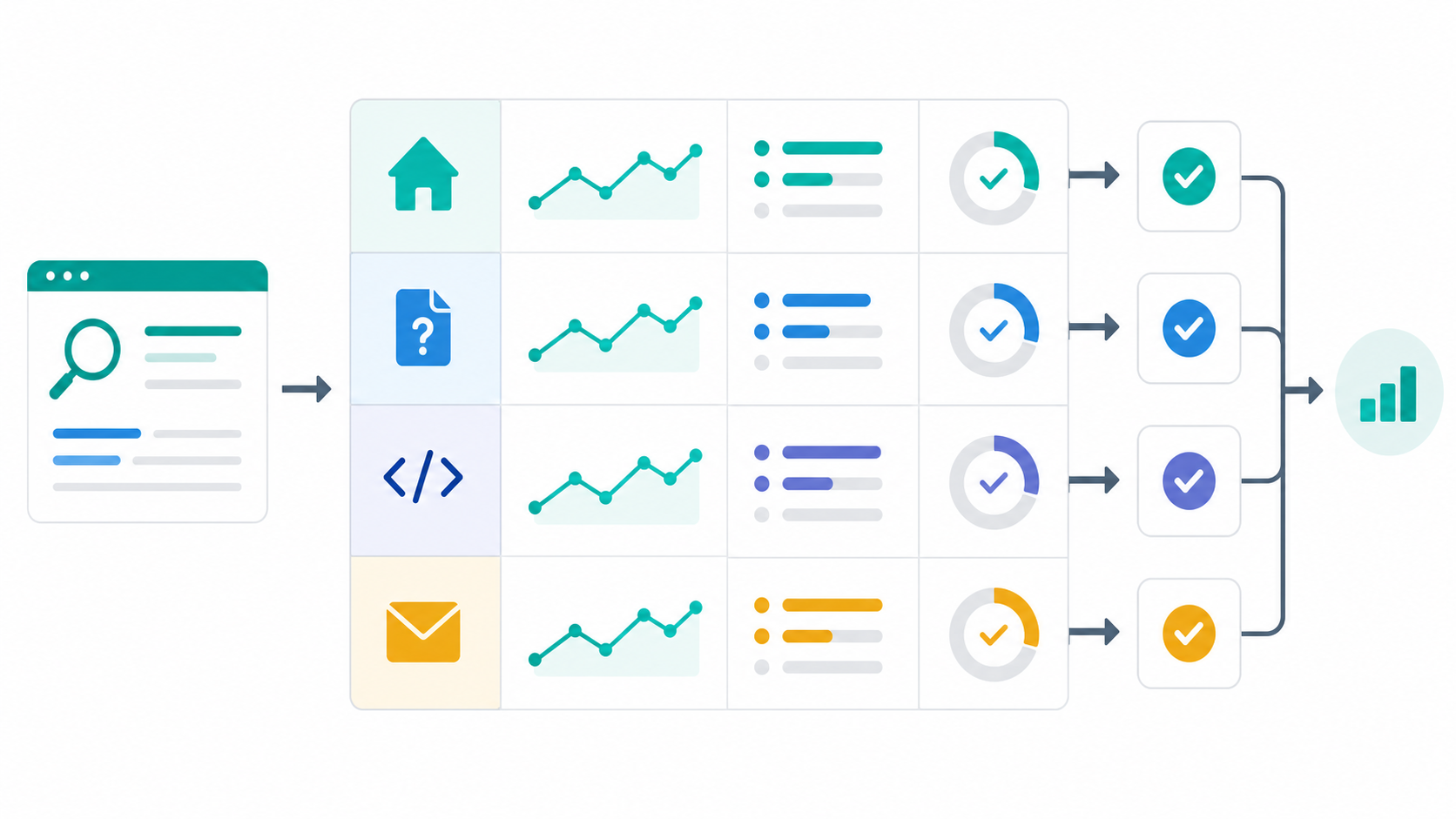
When Search Console shows strong impressions and weak CTR, the first reaction is usually to rewrite titles and descriptions. That is useful only if the team already knows what each page is supposed to produce. A SaaS homepage, help page, API reference, and contact page should not share the same KPI model.
This article is not another page-by-page CTR rewrite guide. The existing guides cover page-role CTR diagnosis, SaaS homepage CTR, API reference CTR, and contact-page CTR. This guide focuses on KPI design: how to separate Search Console CTR, the next on-site action, and the business conversion for each page role.
The short answer: CTR is an entry metric, not the whole KPI
- Treat Search Console CTR as the search-result entry metric
- Define a different next action for homepage, help, API, and contact pages
- Track CTR, next action, conversion, decision rule, and owner in separate columns
- Prioritize low-CTR pages by role and conversion distance, not impressions alone
- Review query shape, CTR, next action, and conversion in that order
- Watch competitor titles, descriptions, and CTAs to improve your own KPI assumptions
Google's Search Console help defines CTR as clicks divided by impressions, and the Performance report lets teams review page and query performance in Google Search (clicks, impressions, and position in Search Console). That metric is useful for search-result response. It does not tell you whether a visitor signed up, solved a support question, prepared an API integration, or sent the right kind of inquiry.
Why CTR alone creates weak decisions
CTR answers one question: did the searcher click the result? SaaS teams then need a second question: did the page do its job after the click?
| Page role | Misread when CTR is the only KPI | What else to review |
|---|---|---|
| Homepage | More clicks look like a completed fix | /register clicks, free signups, first recurring job |
| Help | A high-CTR task page looks successful by itself | Related help navigation, register CTA, setup progress |
| API | More developer traffic looks sufficient | API key path, auth section use, quality of technical inquiries |
| Contact | More contact-page clicks look like demand | Form completion, inquiry type, avoidable support questions |
For example, contact-page CTR can rise while the form receives more basic product-usage questions. That is not a good outcome. An API reference may have modest CTR but still perform well if developers who land there move to authentication, Jobs, Reports, and API key creation.
Step 1: Classify URLs into four roles
Start with page-level Search Console data, then tag each URL by role. Do not sort only by impressions and CTR. Add what kind of searcher the page should receive and what action the page should produce.
| Role | Searcher it should receive | Page job | Acceptable routing |
|---|---|---|---|
| Homepage | Brand, category, and problem searches | Explain the SaaS and move qualified visitors toward free signup | Help, blog, contact |
| Help | People checking setup or workflow steps | Answer the immediate task and route the next question | Related help, blog, register |
| API | Developers checking auth, endpoints, and integrations | Show implementation order and prepare API use | API keys, webhook help, contact |
| Contact | Buyers asking about sales, billing, security, or contracts | Capture conversations that need a human response | Register, help, docs |
Use this classification with the broader guide on improving high-ranking, low-CTR pages. The difference here is sequence: define the KPI model before rewriting search-result copy. That makes the success criteria clear before the title changes.
Relevant help pages can become the role boundaries: dashboard basics, Seed URL setup, and the API reference.
Step 2: Split CTR, next action, and conversion KPIs
Create a KPI table where each page role has three separate metric layers. Do not use CTR as a proxy for conversion.
| Role | CTR KPI | Next-action KPI | Conversion KPI |
|---|---|---|---|
| Homepage | CTR for non-brand category and problem queries | /register clicks, contextual help or blog clicks |
Free signup, first recurring research job |
| Help | CTR for task and setup queries | Related help clicks, register CTA, blog navigation | Signup from help, completed first setup step |
| API | CTR for API, auth, and endpoint queries | API key screen, auth section, webhook help | API key creation, qualified technical inquiry |
| Contact | CTR for sales, billing, security, and procurement queries | Form start, inquiry-type selection, register branch | Form completion, sales qualification, fewer avoidable inquiries |
This table prevents a common reporting problem. A title rewrite may increase CTR and still lower the quality of the resulting action. The reverse can also happen: CTR stays flat, but better internal links move more readers to the right next step.
Step 3: Add event names and decision rules
A KPI table is not operational until the team knows what to inspect. Add event names, decision rules, and owners.
| Role | Event examples | Decision rule example | Owner |
|---|---|---|---|
| Homepage | register_cta_click, homepage_help_link_click |
If CTR rises but register clicks fall, review first-screen promise and CTA copy | Marketing |
| Help | help_related_link_click, help_register_click |
If readers do not continue after the answer, rewrite the next-question link | Content / CS |
| API | api_key_page_view, api_docs_contact_click |
If technical inquiries rise too much, improve docs routing before the form | DevRel / Product |
| Contact | contact_form_start, contact_form_submit, contact_register_click |
If generic inquiries rise, narrow the page description and add self-serve links | Sales / CS |
Event names will vary by analytics setup. The structure matters more than the exact label. Use Search Console for page and query response. Use site analytics for the next action and conversion. Keeping those jobs separate makes review meetings shorter.
Step 4: Prioritize high-impression, low-CTR pages
Starting with the highest-impression URL is reasonable, but it can hide pages that are closer to revenue or product adoption. Use this sequence:
- Pull URLs with meaningful impressions and relatively strong average position
- Tag each URL as homepage, help, API, or contact
- Split queries into role-fit and role-mismatch groups
- Diagnose the gap as search-result promise, first-screen content, internal links, or CTA
- Confirm that the next-action and conversion KPIs are measurable
Then read priority like this:
| State | Priority | First thing to inspect |
|---|---|---|
| High impressions, role-fit queries, weak CTR | High | Title, description, introduction |
| Weak CTR, strong next action | Medium | Make the search-result promise slightly clearer |
| CTR improved, conversion is weak | High | CTA, first screen, internal links |
| Queries do not match the page role | Medium | Page split, headings, internal routing |
| Low impressions and far from conversion | Low | Hold for the next review cycle |
The homepage will usually stand out by volume. Contact and API pages may matter more per visit. Page-role KPI design keeps both factors in view: search demand and conversion distance.
Step 5: Use a one-page weekly review table
For weekly review, keep the table small. Focus on URLs you changed recently and URLs where impressions are starting to grow.
| URL / role | Search Console check | Next action | Conversion | This week's decision |
|---|---|---|---|---|
/en / homepage |
Non-brand query impressions and CTR | /register click, help navigation |
Free signup, first job | If CTR is weak, add use case and first task to the description |
/en/help/seed-url / help |
Seed URL and source-setup queries | Related help, register CTA | First job setup | Connect CTA copy to choosing sources and starting monitoring |
/en/help/api-reference / API |
API, auth, and Jobs queries | API key screen, webhook help | API key creation, technical inquiry | Surface auth and Jobs earlier in title and intro |
/contact / contact |
Sales, billing, and security queries | Form start, register branch | Qualified inquiry | Separate inquiry types from self-serve signup paths |
This table keeps the discussion concrete. A help page may need stronger related-help links before it needs a more aggressive CTA. An API page may need better implementation order before it needs a contact prompt.
Common pitfalls
1. Making CTR the shared goal for every page
CTR is the search-result entry metric. Homepage signup, help self-service, API implementation, and qualified contact inquiries need their own KPI layer.
2. Rewriting titles before measuring the next action
If you cannot see the post-click action, you cannot judge the rewrite. Define the next action before changing copy.
3. Treating contact like another signup page
The contact page should capture conversations that need a human. Visitors who can try the product should go to /register; visitors with setup questions should go to help.
4. Ignoring competitor page changes
CTR can move because another result became clearer. Competitor title, description, docs, and CTA changes are useful context for your own KPI review.
When Stratum Flow fits well
After building the page-role KPI table, the next useful input is competitor movement. If competitors change how their homepages, help centers, API docs, pricing pages, or contact pages are positioned, your Search Console hypotheses may need to change too.
- Track competitor title, description, and CTA changes weekly
- Share help and API docs changes with marketing and product teams
- Bring competitor page-change reports into Search Console review meetings
- Send Slack or Teams alerts when important pages change
With Stratum Flow, you can use Seed URLs to fix competitor pages as sources and run recurring research. Review your own Search Console KPIs and competitor page changes separately first, then combine them when deciding the next rewrite.
Summary
High-impression, low-CTR pages should not be judged by CTR alone. Split homepage, help, API, and contact pages into separate KPI models: CTR, next action, and conversion.
The first deliverable does not need to be a polished dashboard. Build a one-page table with URL, query group, CTR, next action, conversion, decision rule, and owner. That is enough to turn Search Console data into a practical improvement brief.
Next step
Create a four-row KPI table for homepage, help, API, and contact pages. If you also want to monitor competitor page roles and CTA changes, Stratum Flow can run that recurring research from fixed Seed URLs.
Start competitor monitoring for free